UX Framework
The Calibration Void
Interaction Pattern
Overview
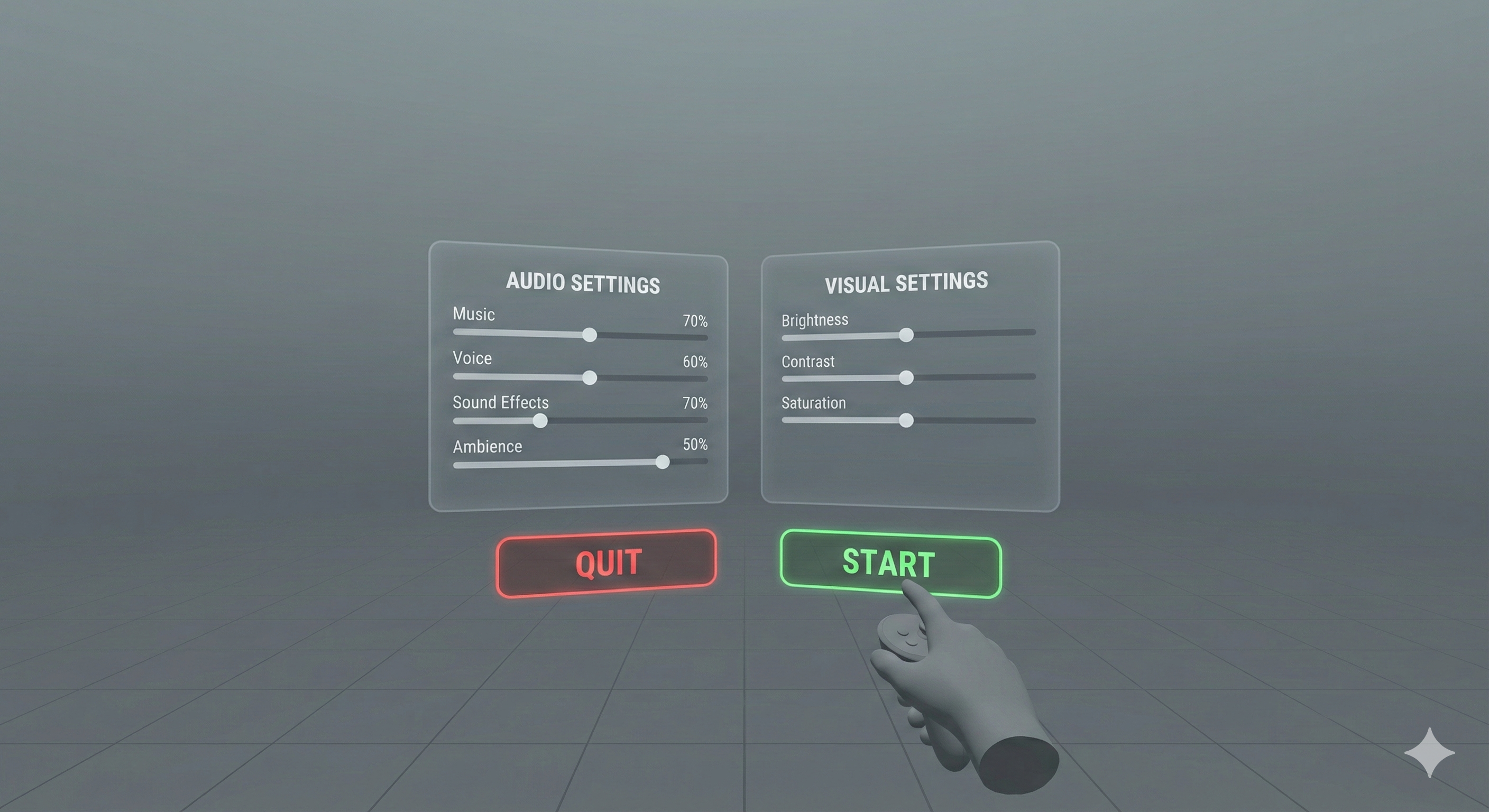
The Calibration Void presents The Sensory Dashboard and other relevant user interface controls within a neutral, low-stimulus virtual environment immediately after the application launches. The full application environment does not load until the user explicitly confirms their readiness. This pattern allows users to adjust and calibrate their sensory and accessibility settings before being exposed to the full intensity of the virtual world, providing a comfortable, safe, and personalised experience from the outset.
Implementation Specification
To successfully execute The Calibration Void, the application architecture must strictly separate the initialisation of the user interface from the instantiation of the primary game world.
- Boot Sequence Interception: The application must override standard asynchronous scene loading. The initial launch state must place the camera rig exclusively within an unlit or softly lit, geometrically simple skybox (the "Void"). No ambient audio or diegetic sound effects should be triggered.
- Interface Instantiation: The system must load and present The Sensory Dashboard immediately within this space. The interface must be anchored at a comfortable default distance, utilising high-contrast elements suitable for a neutral background.
- Deferred Asset Execution: The primary application assets (environmental geometry, complex shaders, spatial audio buses, and particle systems) must remain suspended. If asynchronous loading is required for performance, the loaded assets must remain entirely culled from the render pipeline and audio mixer until authorised by the user.
- Explicit Transition Logic: The Void requires a definitive, user-initiated confirmation to exit. Once the user finalises their parameters and triggers the confirmation event, the engine must globally apply the configured sensory limits before fading the camera into the primary application environment.
Reference Pattern
// Pseudo-code for The Calibration Void Implementation
// Tone: Technical Implementation Guide

Class CalibrationVoidManager : MonoBehaviour {

    // Scene and UI References
    String mainEnvironmentSceneID = "Level_01_Main";
    GameObject sensoryDashboardUI;
    AudioMixer globalAudioMixer;

    // State Management
    Boolean isUserCalibrated = false;

    // Phase 1: Initialisation (The Void)
    Function Start() {
        // Ensure the environment is neutral
        RenderSettings.ambientLight = Color.DarkGrey;
        RenderSettings.skybox = null;

        // Mute all non-essential audio buses immediately
        globalAudioMixer.SetFloat("MasterVolume", -80.0f);
        globalAudioMixer.SetFloat("UI_Volume", 0.0f); // Keep UI audio active

        // Instantiate and present the dashboard
        sensoryDashboardUI.SetActive(true);

        // Listen for the explicit confirmation event from the dashboard
        EventManager.ListenFor("OnCalibrationConfirmed", InitiateWorldTransition);

        Log("Calibration Void instantiated. Awaiting user parameters.");
    }

    // Phase 2: Deferred Loading (Optional background process)
    // Application MAY load assets into memory, but MUST NOT render them
    Function PreloadMainEnvironment() {
        SceneManager.LoadSceneAsync(mainEnvironmentSceneID, LoadSceneMode.Additive);
        // Ensure cameras/audio listeners in the additive scene are disabled upon load
    }

    // Phase 3: Explicit Transition Logic
    Function InitiateWorldTransition(UserProfileData configuredSettings) {
        if (isUserCalibrated) Return;
        isUserCalibrated = true;

        // 1. Apply user's defined sensory parameters globally
        ApplySensoryLimits(configuredSettings);

        // 2. Hide the Calibration Void UI
        sensoryDashboardUI.SetActive(false);

        // 3. Execute the transition (e.g., Fade out, activate main scene, fade in)
        Coroutine.Start(ExecuteFadeToMainWorld());
    }

    Function ApplySensoryLimits(UserProfileData settings) {
        // Push settings to the rendering pipeline and audio mixer before exposing the user
        globalAudioMixer.SetFloat("MasterVolume", settings.masterVolumeLevel);
        globalAudioMixer.SetFloat("Background_Bus", settings.backgroundAudioLevel);
        PostProcessingManager.SetSaturation(settings.visualSaturation);

        Log("User sensory parameters applied successfully.");
    }

    IEnumerator ExecuteFadeToMainWorld() {
        yield return CameraFade.FadeToBlack(1.0f);

        // Activate the pre-loaded environment or load it now
        SceneManager.SetActiveScene(mainEnvironmentSceneID);

        yield return CameraFade.FadeFromBlack(1.0f);
    }
}
Dependencies
Anticipatory Configuration Behaviour: A specific implementation of the broader Anticipatory Configuration behaviour, which encompasses any mechanism that allows users to make adjustments before full immersion.
The Sensory Dashboard: Relies on the Sensory Dashboard as the interface through which users can make their initial adjustments to audio and visual settings before entering the main experience.