UX Framework
The Magic Slingshot
Interaction Pattern
Overview
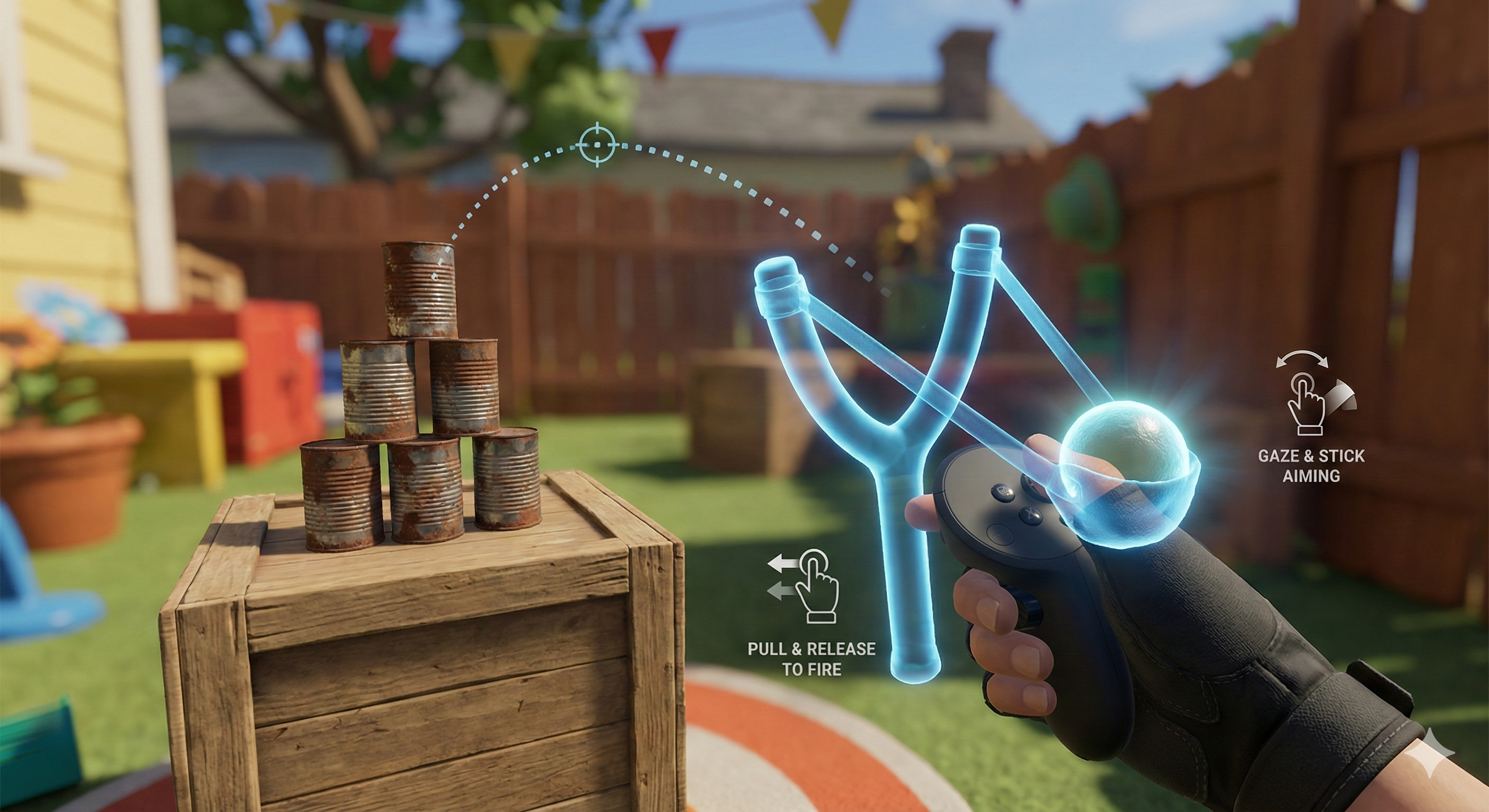
The Magic Slingshot is an input abstraction module that replaces complex, bimanual gross-motor mechanics (such as drawing a bow or pulling a physical slingshot) with a single-controller, micro-motor alternative. By mapping the tension and release phases to the hardware thumbstick and decoupling the aiming matrix to utilise gaze kinematics, this pattern allows users with severe arm mobility restrictions to execute projectile-firing mechanics without requiring arm extension, wrist rotation, or two-handed coordination.
Implementation Specification
Aiming (x/y axis) is controlled by utilising one of, or a combination of, 'gaze' (or eye-tracking where available) and sideways shift thumbstick movements.
Power is controlled by thumbstick pull-back (z-axis).
Release is automatic upon letting go of the stick. The thumbstick's in-built spring mechanism allows for a natural 'snap back' to the neutral position, which is used to trigger the release of the projectile without requiring an additional button press.
To successfully execute The Magic Slingshot, the application architecture must decouple spatial hand tracking from the projectile logic, relying instead on thumbstick telemetry and gaze vectors.
- Single-Controller Abstraction: The module must function entirely on a single controller. It must not require a secondary controller to anchor the base of the slingshot or draw the projectile.
- Kinematic Targeting (Aiming): The spatial targeting (X/Y axis) must be decoupled from the physical position or rotation of the user's wrist. Aiming must be driven by a primary gaze vector (head-tracking or eye-tracking), with optional horizontal micro-adjustments driven by the thumbstick's X-axis.
- Tension Mapping (Power): The potential energy or velocity of the projectile must be mathematically mapped to the vertical backward pull (local Z-axis or Y-axis) of the thumbstick. As the user pulls the stick downwards/backwards, the system must render corresponding visual and haptic feedback to communicate building tension.
- Hardware-Driven Release: The system must not require a secondary button press to fire. Instead, it must utilise the thumbstick's physical hardware spring. When the user releases the stick, allowing it to rapidly snap back to its neutral origin (the deadzone), the system must intercept this rapid delta-to-zero as the explicit trigger to execute the release event.
Reference Pattern
// Pseudo-code for The Magic Slingshot Implementation
// Tone: Technical Implementation Guide

Class MagicSlingshotManager : MonoBehaviour {

    // Configuration
    Float maxLaunchVelocity = 25.0f;
    Float thumbstickDeadzone = 0.1f;
    Transform gazeOrigin; // Head or Eye tracking source

    // State Management
    Boolean isDrawing = false;
    Float currentTension = 0.0f;
    Vector3 currentAimVector;

    // References
    GameObject projectilePrefab;
    Transform spawnPoint;

    // Main Execution Loop
    Function Update() {
        ProcessAiming();
        ProcessTensionAndRelease();
    }

    // Phase 1: Kinematic Targeting
    Function ProcessAiming() {
        // Primary aim driven by gaze
        currentAimVector = gazeOrigin.forward;

        // Optional: Read thumbstick X-axis for horizontal micro-adjustments
        Float xAxisInput = Input.GetAxis("Thumbstick_X");
        If (Mathf.Abs(xAxisInput) > thumbstickDeadzone) {
            currentAimVector = ApplyHorizontalOffset(currentAimVector, xAxisInput);
        }

        // Update the visual targeting reticle
        RenderTargetingReticle(currentAimVector);
    }

    // Phase 2: Tension & Hardware Release
    Function ProcessTensionAndRelease() {
        // Read the backward pull (Y-axis or Z-axis depending on API)
        Float yAxisInput = Input.GetAxis("Thumbstick_Y");

        If (yAxisInput < -thumbstickDeadzone) {
            // User is pulling back: Build tension
            isDrawing = true;

            // Map input (-0.1 to -1.0) to a positive tension scalar (0.0 to 1.0)
            currentTension = Mathf.Abs(yAxisInput);

            // Render multimodal tension feedback
            UpdateBowstringVisuals(currentTension);
            PlayHapticFeedback("TensionRumble", intensity: currentTension);

        } Else If (isDrawing AND Mathf.Abs(yAxisInput) <= thumbstickDeadzone) {
            // User released the stick: It snapped back to the neutral deadzone
            ExecuteLaunch();
        }
    }

    // Phase 3: Execution
    Function ExecuteLaunch() {
        // Instantiate the projectile
        GameObject projectile = Instantiate(projectilePrefab, spawnPoint.position, Quaternion.LookRotation(currentAimVector));

        // Calculate final velocity based on the tension state prior to release
        Float appliedVelocity = maxLaunchVelocity * currentTension;
        projectile.GetComponent<Physics>().velocity = currentAimVector * appliedVelocity;

        // Reset state
        isDrawing = false;
        currentTension = 0.0f;
        UpdateBowstringVisuals(0.0f);

        PlayAudioFeedback("SnapAndLaunch");
    }
}
Dependencies
Input Mirroring Behaviour: The Magic Slingshot relies on the Input Mirroring behaviour to allow users to control aiming with either hand, regardless of which hand is holding the controller. This ensures that the aiming direction corresponds intuitively to the user's dominant hand, enhancing accessibility and ease of use.
Gesture Abstraction Behaviour: The Magic Slingshot is an example of a specific implementation of the broader Gesture Abstraction behaviour, which encompasses any mechanism that abstracts complex gestures into simpler input methods, allowing for more accessible interactions.
Enhancements
Assisted Dexterity (smoothing) can be used in conjunction with the Magic Slingshot to allow users with fine motor control difficulties to more easily aim and release projectiles, by smoothing out input.
Multimodal Consistency should be implemented to ensure that visual, auditory, and haptic feedback are perfectly synchronised when users interact with the Magic Slingshot, reducing sensory confusion and enhancing the overall user experience.